Transactional notifications for business events
Send order confirmations, payment receipts, booking updates, and account alerts across email, SMS, WhatsApp, push, and in-app.
When an order is placed, a payment clears, or a booking changes, your system triggers a Nudge handler. Nudge applies the message template and channel settings, and your connected providers handle external delivery.
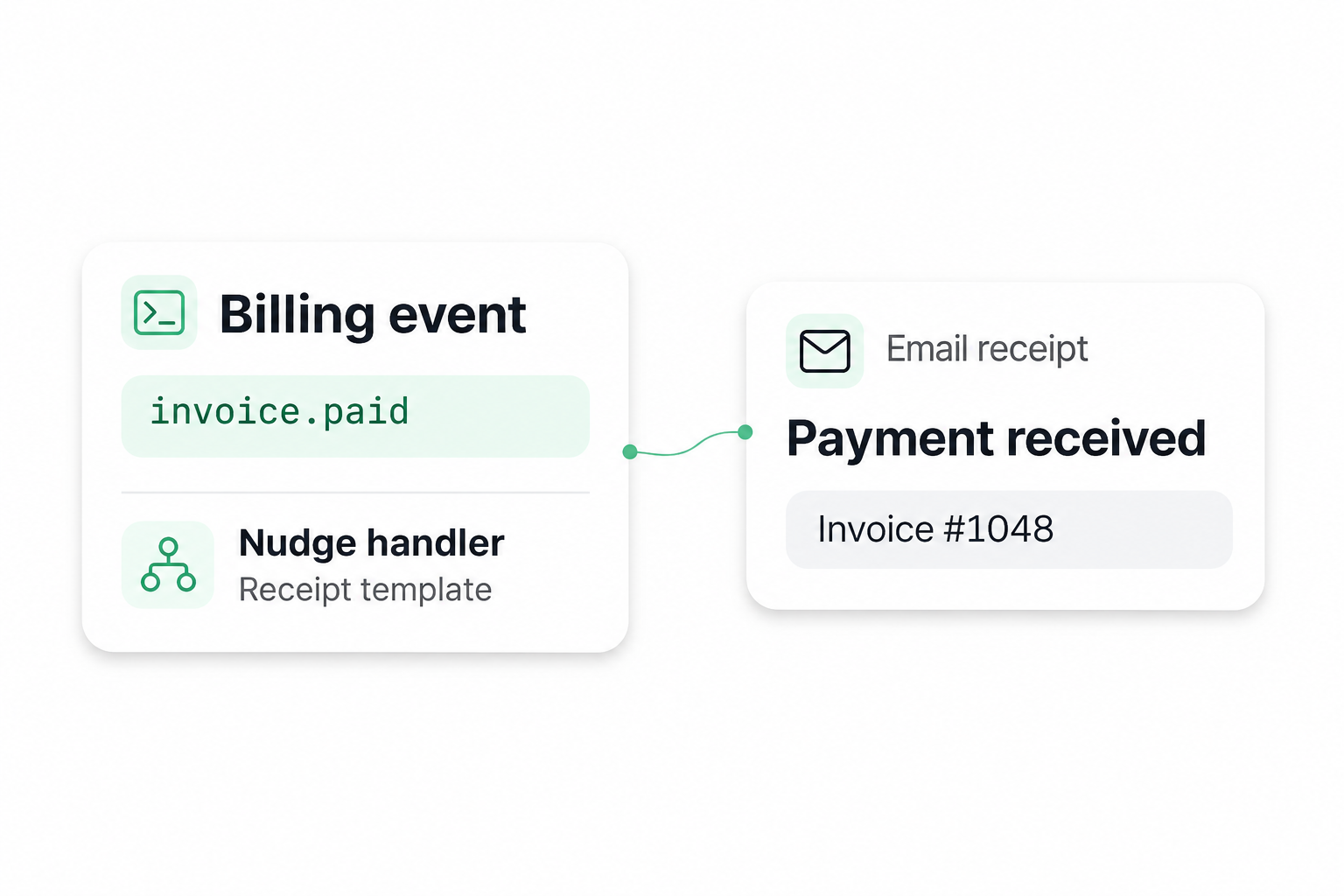
Set up the message and trigger it when the event happens

Configure the notification in Nudge
Templates and channels
Create a reusable handler for a business event. Set up what the message should say and the channels it can use.
- Set up an email receipt with the amount paid and a receipt link
- Create an SMS template for a pickup notice with the location and time

Trigger it when the event happens
Backend and notification API
When your order, billing, booking, or account system records a change, have your backend call the configured handler with the recipient and event details.
- Send a confirmation when a customer places an order
- Notify the affected customer when their appointment moves
Configure transactional messages for each business event
Choose who receives the update, what they need to know, and which channel helps them act. Manage templates and channel settings in Nudge.
Templates for each channel
Use an email template for a detailed receipt, a short SMS or push message for an alert, and an in-app notification that links to the next step.
Connect your existing providers
Connect a supported email, SMS, WhatsApp, or push integration and review its sender settings before testing. Set up in-app notifications for updates customers can see inside your product.
Trigger messages from your business systems
Call the notification API when a payment clears, an order ships, a booking changes, or an account setting is updated. Pass the recipient and the details the message needs.
Choose channels for each update
Use the channels configured for the event. For example, email a receipt the customer can keep, or send a short SMS when an order is ready for pickup.
Apply recipient preferences and send policies
Review the recipient preferences and send rules that apply to each workflow, especially when an update can reach a customer on several channels.
Review notification execution
Check the execution and delivery states available for the configured channel. Use a known test recipient to verify the message and channel before connecting a live event.
Transactional notification examples by business event
Each message tells someone what happened with their order, payment, booking, account, or application and what to do next.
Order confirmations by email
When a customer places an order, email the order number, purchased items, and a link to view the details.
Payment receipts by email
When a payment succeeds, email the payer the amount, payment reference, and a link to the receipt.
Delivery and pickup updates by SMS
When an order is out for delivery or ready for pickup, text the customer the expected arrival time or pickup instructions.
Booking changes on WhatsApp
Use a configured template to tell the customer when a confirmed appointment or reservation changes. Include the revised time or a link to the booking.
Account security alerts by push
When an account security setting changes, send the account owner a push notification that opens the relevant settings.
Application status updates in-app
When an application or service request moves to a new stage, show the applicant the new status and their next step inside the app.
HOW IT WORKS
How a paid invoice becomes an email receipt
Follow a payment from the billing system to an email receipt. Use the same handler pattern for orders, bookings, and other business events with the channels configured for each.
STEP 01
Record the payment
Your billing system records the payment, identifies the recipient, and emits a business event such as invoice.paid.
STEP 02
Trigger the receipt handler
Your backend calls the DokaAI API for the receipt handler. Pass the recipient and the data the template needs, such as the invoice number, amount paid, and receipt link.
STEP 03
Send the receipt through your provider
Nudge fills the configured email template and hands the message to your connected email provider, which sends the receipt.
Record the payment
Your billing system records the payment, identifies the recipient, and emits a business event such as invoice.paid.
Trigger the receipt handler
Your backend calls the DokaAI API for the receipt handler. Pass the recipient and the data the template needs, such as the invoice number, amount paid, and receipt link.
Send the receipt through your provider
Nudge fills the configured email template and hands the message to your connected email provider, which sends the receipt.
Frequently asked questions about transactional notifications
A transactional notification gives someone information about a specific action, transaction, or status change that affects them. Order confirmations, payment receipts, booking changes, and account security alerts are common examples.
Pilot your first transactional notification
Pick an order confirmation, receipt, booking update, or account alert you already send. Configure one channel in Nudge and test it with one recipient.
